
Table of contents expand_more
How to reset your OpenGlob password
If you’ve forgotten your OpenGlob password, you can reset it using your recovery key.
OpenGlob does not use email-based reset links. Instead, when you first created your account, you were given a unique recovery key and asked to save it somewhere secure. That key acts as your backup access method. It allows you to reset your password directly without waiting for email verification.
If you saved your recovery key properly, the process is quick.
To begin, go to:
On the login screen, enter your email address and attempt to sign in. If the password is incorrect, you will see an error message. Below the password field, you’ll find the “Forgot password?” option.
Click that button.
The full recovery process is shown below:
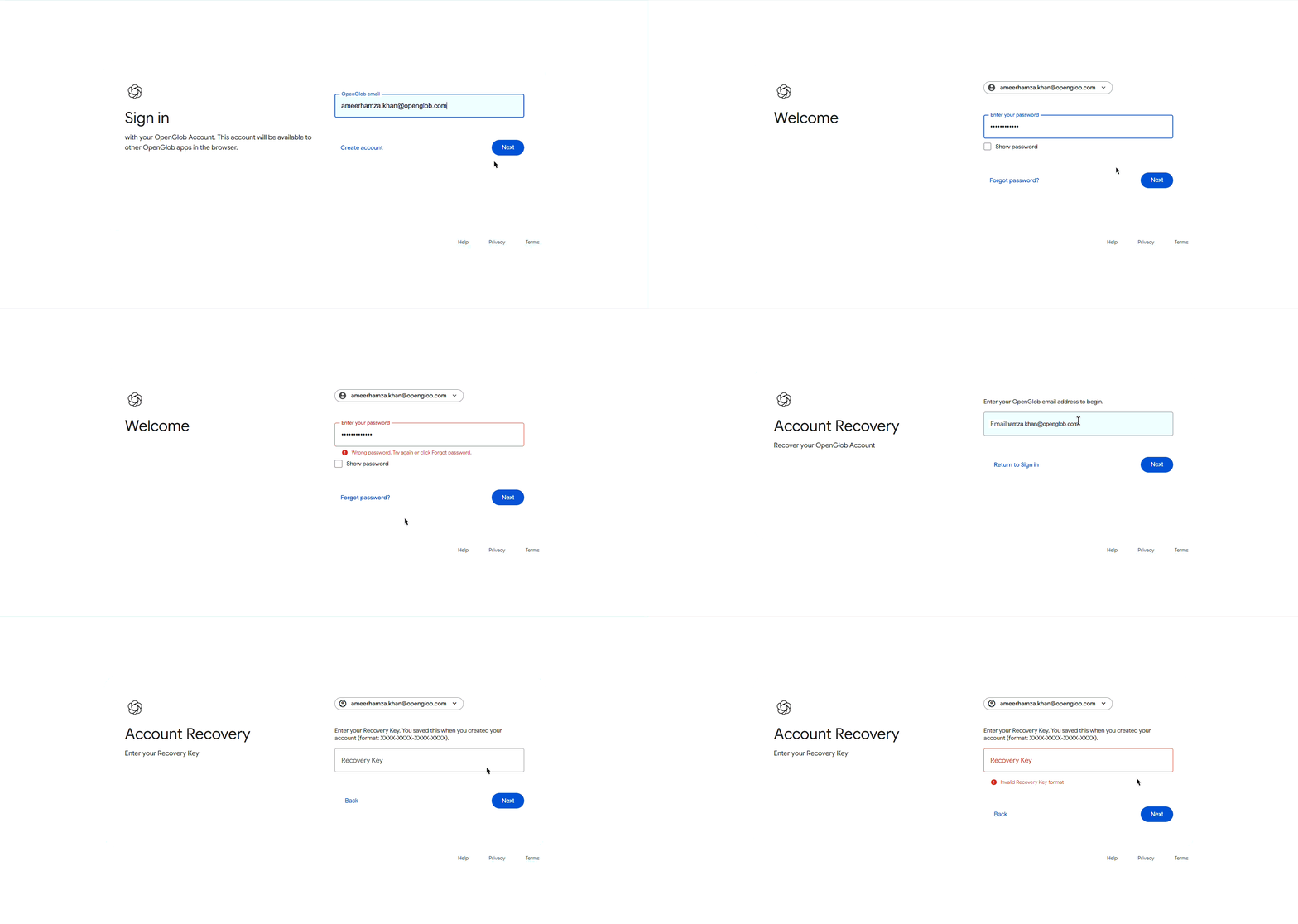
After clicking “Forgot password?”, you will be taken to the recovery page. There, you’ll be asked to enter your registered email address along with your recovery key.
Open the location where you saved your recovery key. This might be a password manager, a secure document, a notes app, or an offline storage location.
Copy the recovery key exactly as it was originally provided.
Paste it into the recovery field and continue.
If the key matches your account, you will immediately be allowed to set a new password. Choose a strong password that you have not used before. Confirm it, submit the form, and your password will be updated instantly.
Once completed, return to:
and log in using your new password.
There is no email confirmation step, and no waiting period. The recovery key is the verification.
Your recovery key is extremely important.
It functions as a secure backup credential for your account. If you lose both your password and your recovery key, there may be no way to restore access. OpenGlob currently does not rely on secondary recovery emails or identity checks. The recovery key is the primary reset mechanism.
If you still have access to your account, it is a good idea to confirm that your recovery key is stored safely. Consider keeping it in more than one secure location.
If your recovery key does not work, double-check that you are entering the correct email address and that there are no extra spaces before or after the key. Recovery keys are case-sensitive and must match exactly.
Resetting your password is designed to be simple and direct. As long as your recovery key is safe, you retain full control of your OpenGlob identity.